Starting point

Purchasing & demand
Turn approved internal requests into purchase orders
A completed internal request is compared with the item, the supplier and the agreed release limit of the cost center. If the case is clearly within the rules, a purchase order is created; missing details and breaches stay a decision for purchasing.
Process architecture
From an internal request to a purchase order or an open case.
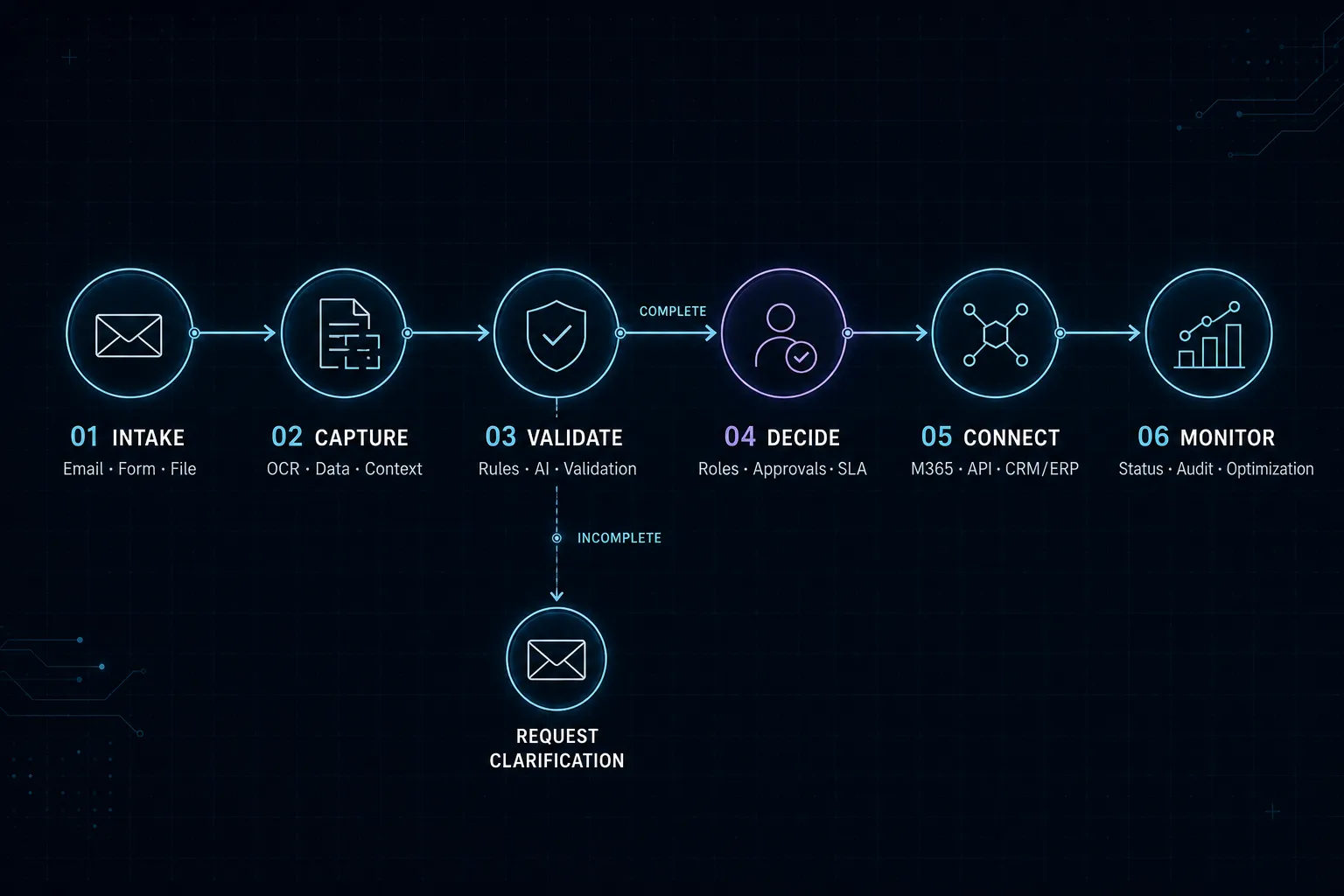
The chain starts when an internal request is submitted. Item, supplier and release limit are read before a purchase order is created. Clear cases are written by the ERP; everything else stays a decision and is not ordered silently.
01Input
Request & master data
A completed request is detected and enriched with the item, the supplier and the cost center's release limit.
2 Steps
02Process
Comparison & decision
The request is set against master data and the release limit. Missing details and breaches are decided by purchasing.
4 Steps
03Output
Order & evidence
The purchase order or the open case is in the ERP, the requester sees the same status and the request remains findable.
4 Steps
Source01Take in the request
Microsoft Power Automate takes a completed request from Microsoft Forms and opens a case for each response with its id and the requester.Details
Take in the request
Microsoft Power Automate takes a completed request from Microsoft Forms and opens a case for each response with its id and the requester.
Interfaces
- Microsoft Graph API
- SharePoint API
Next steps
- Load item and supplier
Data02Load item and supplier
Microsoft Dynamics 365 Business Central API reads the item, supplier, open orders and the cost center's release limit. An unknown item is not guessed.Details
Load item and supplier
Microsoft Dynamics 365 Business Central API reads the item, supplier, open orders and the cost center's release limit. An unknown item is not guessed.
Interfaces
- Azure AI Document Intelligence
- Mistral OCR
- Dataverse API
Next steps
- Compare the request
Action03Compare the request
Microsoft Power Automate sets quantity, supplier and amount against the stored limit. A missing cost center or an empty supplier is flagged rather than filled in.Details
Compare the request
Microsoft Power Automate sets quantity, supplier and amount against the stored limit. A missing cost center or an empty supplier is flagged rather than filled in.
Interfaces
- Power Automate
- Azure Functions
- Microsoft Graph API
Next steps
- Check the release limit
- Decide the exceptionDetails missing
Decision04Check the release limit
The workflow checks that item and supplier are unambiguous and that the request sits within the agreed limit. A breach or a conflict goes to purchasing.Details
Check the release limit
The workflow checks that item and supplier are unambiguous and that the request sits within the agreed limit. A breach or a conflict goes to purchasing.
Interfaces
- Azure OpenAI GPT
- Anthropic Claude
- AI Builder
Next steps
- Write the purchase orderWithin the limit
- Decide the exceptionReview needed
Approval05Decide the exception
Microsoft Teams Adaptive Cards presents the request, the item and the limit to purchasing. A person orders, rejects or asks for details; silence is not an order.Details
Decide the exception
Microsoft Teams Adaptive Cards presents the request, the item and the limit to purchasing. A person orders, rejects or asks for details; silence is not an order.
Interfaces
- Teams Adaptive Cards
- Power Apps
Next steps
- Write the purchase order
- Flag the open caseRejected
System06Write the purchase order
Microsoft Dynamics 365 Business Central API creates only the confirmed purchase order or records the rejection. The same request id does not create a second order.Details
Write the purchase order
Microsoft Dynamics 365 Business Central API creates only the confirmed purchase order or records the rejection. The same request id does not create a second order.
Interfaces
- Dynamics 365 API
- Azure Service Bus
Next steps
- Show order or rejection
Result07Show order or rejection
Purchasing and the requester see in the ERP whether an order was created or the case stays open. The status is not a goods receipt.Details
Show order or rejection
Purchasing and the requester see in the ERP whether an order was created or the case stays open. The status is not a goods receipt.
Interfaces
- Power BI API
- Teams Webhook
Next steps
- Inform the requester
- File the request
Result08Inform the requester
Microsoft Graph API tells the requester about the order or rejection with the same request reference. The message does not include other suppliers' terms.Details
Inform the requester
Microsoft Graph API tells the requester about the order or rejection with the same request reference. The message does not include other suppliers' terms.
Interfaces
- Power BI API
- Teams Webhook
Result09File the request
SharePoint REST API stores the request in the restricted library, linked to the purchase order or to the open case.Details
File the request
SharePoint REST API stores the request in the restricted library, linked to the purchase order or to the open case.
Interfaces
- Power BI API
- Teams Webhook
Result10Flag the open case
A request without a clear basis or without a decision stays open with a named owner. It does not appear as a purchase order.Details
Flag the open case
A request without a clear basis or without a decision stays open with a named owner. It does not appear as a purchase order.
Interfaces
- Power BI API
- Teams Webhook
Next steps
- File the request
System landscape
Microsoft 365 connects the request and purchasing.
- Microsoft
Microsoft Graph API
Möglicher Baustein für die Microsoft-Systemvariante.
- Microsoft
SharePoint API
Möglicher Baustein für die Microsoft-Systemvariante.
- Microsoft
Azure AI Document Intelligence
Möglicher Baustein für die Microsoft-Systemvariante.
- Microsoft
Mistral OCR
Möglicher Baustein für die Microsoft-Systemvariante.
- Microsoft
Dataverse API
Möglicher Baustein für die Microsoft-Systemvariante.
- Microsoft
Power Automate
Möglicher Baustein für die Microsoft-Systemvariante.
- Microsoft
Azure Functions
Möglicher Baustein für die Microsoft-Systemvariante.
- Microsoft
Azure OpenAI GPT
Möglicher Baustein für die Microsoft-Systemvariante.
- Microsoft
Anthropic Claude
Möglicher Baustein für die Microsoft-Systemvariante.
- Microsoft
AI Builder
Möglicher Baustein für die Microsoft-Systemvariante.
- Microsoft
Teams Adaptive Cards
Möglicher Baustein für die Microsoft-Systemvariante.
- Microsoft
Power Apps
Möglicher Baustein für die Microsoft-Systemvariante.
- Microsoft
Dynamics 365 API
Möglicher Baustein für die Microsoft-Systemvariante.
- Microsoft
Azure Service Bus
Möglicher Baustein für die Microsoft-Systemvariante.
- Microsoft
Power BI API
Möglicher Baustein für die Microsoft-Systemvariante.
- Microsoft
Teams Webhook
Möglicher Baustein für die Microsoft-Systemvariante.
- Interfaces in use
Microsoft Power Automate
Takes completed requests and sets them against item, supplier and the release limit.
- Interfaces in use
Microsoft Dynamics 365 Business Central API
Reads item, supplier and release limit and writes back only the confirmed order or rejection.
- Interfaces in use
Microsoft Teams Adaptive Cards
Presents breaches and missing details to purchasing for an explicit decision.
- Interfaces in use
SharePoint REST API
Stores the request in the restricted library, linked to the order or the open case.
- Possible apps & platforms
Microsoft Forms
Staff submit the need with cost center, item and requested date.
- Possible apps & platforms
Microsoft Dynamics 365 Business Central
Items, suppliers and purchase orders remain the authoritative records.
- Possible apps & platforms
Microsoft Teams
Purchasing decides breaches and missing details against the specific request.
- Possible apps & platforms
Microsoft Outlook
The requester receives the reply about the order or rejection.
- Possible apps & platforms
Microsoft SharePoint
Authorized roles find the filed request.
Implementation in context
An internal request becomes a purchase order or an open case.
This workflow starts when a person submits a specific need, not when stock falls below a reorder point, a supplier confirms an existing order or an invoice arrives. Business Central remains authoritative for item, supplier and purchase order. A created order means the request met the agreed checks. It does not prove that the goods have already arrived.
The check covers requester, cost center, item, quantity, supplier and the stored release limit. An unknown item, an unapproved supplier or a breach goes to purchasing. A missing reply, an incomplete request or a repeat of the same id does not create another order.
Requests include names and cost centers and can therefore contain personal details. The requester receives the decided status, not the terms of other suppliers. Access to the form, Teams, mail and the SharePoint library is limited to the responsible roles, and retention of the requests is agreed with the business.
The request id links the master data that was read to the order that was written. The current item is read again before writing. If Business Central is temporarily unavailable, the case stays open instead of appearing ordered. Repeated runs do not create a second order for the same request.
Target picture
Every completed request has a documented check. Clear cases are ordered, breaches stay open until purchasing decides, and the same request does not create a second order.
Expected benefits
- Purchasing and the requester can see whether the request became an order.
- Unknown items and breaches are not ordered without a decision.
- The same request does not create a second order.
- The requester learns of the order or rejection against the same request.
- The original request remains findable with the order or the open case.
Prerequisites to start
- 01Business Central maintains items, suppliers, cost centers and purchase orders and exposes a documented interface for them.
- 02Purchasing and the departments agree which details a request needs and when the release limit requires a decision.
- 03An application registration with limited rights for Business Central, Forms, Teams, Outlook and SharePoint is in place.
- 04A named purchasing owner, including a substitute, decides breaches.
- 05Permissions and retention for the request library are agreed.
- 06Test cases cover a clear request, an unknown item, a breach and a repeated id.
More use cases
Matching solutions from your industry

Reception & visit coordination
Prepare visitor registrations for reception
A visitor registration is checked against visit time, location and a responsible host, then shared with reception only after that host confirms it. Uncertain registrations remain open for clarification; the entry supports preparation but replaces neither identity checks nor an access decision.
Each registration has one case with necessary details and an explicit host decision. Authorized reception staff see confirmed expected visits, while unresolved registrations stay separate with a responsible owner.
- Microsoft Power Automate
- Microsoft Graph API
- Microsoft Dataverse Web API
- Microsoft Teams Adaptive Cards

Finance and receipts
Automatically file expenses from receipt photos
Every receipt photo from Microsoft Outlook, Gmail or the line-of-business mailbox is read, checked against travel policy and submitted as a reimbursement claim in the system of record. Only unreadable shots and amounts outside the agreed limits go to a person; everything else is ready for a decision the same day.
Every receipt has an owner, a cost centre and a visible status. Inside policy the claim is created without retyping. Exceptions sit with the person who may decide, together with the image and the rule that was applied.
- Microsoft Graph API
- Gmail API
- REST API
- Azure AI Document Intelligence
Scheduling & dispatch
Turn booking requests into calendar appointments
Every booking request from the shared mailbox, web form or chat is checked against opening hours, duration and free slots in Microsoft Outlook, Google Calendar or the line-of-business system, then booked as a firm appointment. Only requests without a clear slot reach dispatch; confirmation stays on the same case.
Every booking request leads to a checked calendar entry or to a reasoned reply on the same case. Dispatch decides only where no clear slot exists. Microsoft Outlook, Google Calendar or the line-of-business system remain the system of record; Nexaluna connects them and does not replace them.
- Microsoft Graph API
- Google Calendar API
- REST API
- Webhook

People & onboarding
Handle applications and prepare the first day
Every application is captured on the day it arrives, matched against the job profile and handed to the hiring manager ready for a decision. Once an offer is accepted, contract, accounts, equipment and the induction plan follow from the same case instead of a chain of reminders.
Every application is captured on the day it arrives, checked for completeness and handed over ready for a decision. After the offer is accepted, contract, accounts, equipment and induction plan run from the same case, and every decision is traceable with its reason and its deadline.
- Microsoft Graph API
- REST API
- Azure AI Document Intelligence
- Azure OpenAI Service

Contracts & deadlines
Monitor contract deadlines and termination dates automatically
Every running contract gets its termination deadline calculated automatically and reports itself in time before the decisive date – in the environment already in place, whether Microsoft 365, Google Workspace or a self-hosted system. The responsible person only decides whether to renew, renegotiate or terminate.
Every contract has a calculated termination date and a lead time in which a decision can be made. The responsible person is informed in time, not once the deadline is already tight, and makes the decision themselves. What remains on each contract is a traceable record of when and how it was decided.
- Microsoft Graph API
- Azure AI Document Intelligence
- Google Drive API
- Google Sheets API
Finance and receivables
Send payment reminders from overdue invoices automatically
Every overdue open item from Microsoft Dynamics 365 Business Central, DATEV or the line-of-business system is checked against due date, grace period and reminder level and sent as a payment reminder through Microsoft Outlook or Gmail. Only blocked customers, missing recipients and amounts outside the agreed level go to finance; everything else leaves the same day.
Every overdue open item receives the next allowed reminder from the stored template as soon as due date and grace period are met. Only blocked customers, missing recipient addresses and amounts outside the agreed level reach finance as a case ready for a decision. Send, reminder level and record sit in the system of record, not in a private list.
- Microsoft Graph API
- Gmail API
- REST API
- Webhook
Your next step
Which process costs your team unnecessary time every day?
Give us a short outline. We will tell you honestly where automation is useful—and where it is not.